Filters
Version: v3.0.0 Status: Normative (text), Illustrative (diagrams only) Scope: Constraining displayed data using filter criteria Domain: FILTERS
Statement
The system shall allow users to constrain displayed data using filter criteria that limit records to those matching specified conditions.
Filtering provides reusable functionality across multiple screens and data views. Users can combine multiple filter criteria (AND logic), use different filter types (text, date, categorical), and toggle filter visibility without losing their selections. Available filter values update dynamically based on current selections in other filters.
Behavior Overview (Illustrative)
This diagram illustrates the high-level behavior. It does not specify UI layout, styling, or interaction details.
Definitions
| Term | Definition |
|---|---|
| Filter Criteria | A constraint applied to a dataset that limits displayed records to those matching specified conditions |
| Filter State | The current configuration of all active filter selections |
| Dynamic Refinement | Automatic update of available filter values based on selections in other filters |
| Exact Match | Filter mode requiring complete equality between filter value and data value |
| Prefix Match | Filter mode matching data values that begin with the filter value |
Functional Requirements
Data Filtering (REQ-FILTERS-001)
FR-FILTERS-001 Filter Data by Criteria
The system shall allow users to constrain displayed data using filter criteria.
Acceptance Criteria:
Core Filtering:
- Filter criteria shall constrain the dataset deterministically
- Multiple filter criteria may be combined (AND logic)
- Clearing all criteria shall restore the unfiltered dataset
- When no data matches the applied criteria, the system shall indicate an empty result set
Filter Types:
- Supported filter types shall include text, date, and categorical (dropdown)
- Text matching modes shall include exact match (full equality) and prefix match (starts-with)
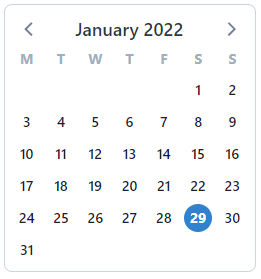
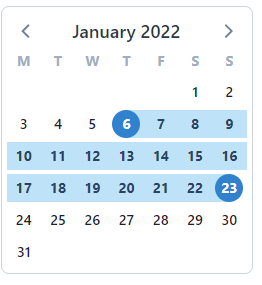
- Date selection shall support single date or contiguous date range
- Categorical selection shall support multi-select from available values
Filter Behavior:
- Text filter criteria shall be applied as user input changes (real-time filtering)
- Date and categorical filter criteria shall be applied upon user confirmation
- Available filter values shall update based on current selections in other filters (dynamic refinement)
Filter State Management:
- Filter state shall be preserved when toggling filter visibility
- Filter section visibility shall be toggleable without clearing active filters
- Bulk clear operation shall be available to reset all filters simultaneously
Convenience Operations:
- Date navigation shall be limited to periods containing data values
- Categorical filter values shall support "select all" and "clear all" operations
Error Handling:
- Filter operation timeout: The system shall display "Filter operation timed out. Please refine your criteria."
- Invalid date range (end before start): The system shall prevent selection of invalid date ranges
Trace: Source: 3.0.0-Filters (Rows 1-31) | Jira: BT-2415 | Tests: BT-2720
Configuration Options
| Option | Default | Description | Affects |
|---|---|---|---|
default_filter_visibility | per-screen | Default visibility state for filter section | REQ-FILTERS-001 |
default_text_match_mode | prefix | Default matching mode for text filters (exact or prefix) | REQ-FILTERS-001 |
dynamic_refinement_enabled | true | Whether filters auto-refine based on other selections | REQ-FILTERS-001 |
filter_apply_debounce_ms | 300 | Debounce delay for text filter input | REQ-FILTERS-001 |
Assumptions
- Users accessing filter functionality have appropriate role permissions for the underlying data
- Data columns designated as filterable are identified in screen configurations
- Filter criteria are applied server-side for large datasets
- Network connectivity is available for filter operations
UI Notes (Illustrative)
FR-FILTERS-001 UI Specifications
Text Filter Layout:
- Text input field with immediate filtering behavior
- Clear icon within field to remove entered text
Date Filter Layout:
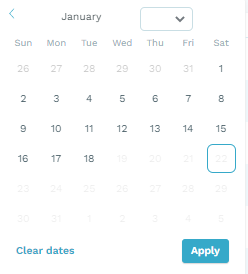
- Calendar picker displaying one month at a time
- Year selector dropdown in header
- Month navigation controls (forward/backward)
- Days with data values displayed in normal font
- Days without data values displayed in greyed style
- Today's date circled regardless of data availability
- Selected date/range displayed below filter name
- Apply button to confirm selection
- Clear dates button to remove selection
- Reference implementation: vcalendar.io
Dropdown Filter Layout:
- List of available values with checkboxes
- Select all button
- Clear filter button
- Apply button to confirm selection
- Selected values shown as comma-separated list below filter name
- Long selection lists truncated with ellipsis ("...")
Filter Section Layout:
- Show/Hide toggle control
- Reset filters button for bulk clear
- Unavailable filters display no-entry symbol on hover
Visual States:
- Active filter: filter name with selected value(s) displayed
- Empty result: column headers with "no data found" message centered
- Disabled filter: grayed appearance with no-entry symbol on hover
Screenshots
The following screenshots illustrate the design specifications:
- Empty table state:

- Date filter month view:

- Today indicator:
- Single date selection:
- Date range selection:
- Selection display:

- Dropdown selection:

- Long list truncation:

- Reset filters button:

Implementation (Illustrative)
REQ-FILTERS-001: Filter Data by Criteria
| Component | Type | Location | Purpose |
|---|---|---|---|
Filterable | Trait | code/app/Filterable.php | Enables Eloquent models to apply filter criteria via scopeFilter() |
BaseFilters | Class | code/app/Filters/BaseFilters.php | Base class providing request-to-query filter dispatch infrastructure |
RunFilters | Class | code/app/Filters/RunFilters.php | Run-specific filter methods (dates, statuses, mixes, sites) |
AuditFilters | Class | code/app/Filters/AuditFilters.php | Audit entry filter methods |
ObservationFilters | Class | code/app/Filters/ObservationFilters.php | Observation filter methods |
WellFilters | Class | code/app/Filters/WellFilters.php | Well filter methods |
MixFilters | Class | code/app/Filters/MixFilters.php | Mix filter methods |
TargetFilters | Class | code/app/Filters/TargetFilters.php | Target filter methods |
ReportingFilters | Class | code/app/Filters/ReportingFilters.php | Reporting-specific filter methods |
ReportFiltersMixesController | Controller | code/app/Http/Controllers/ReportFilters/ReportFiltersMixesController.php | Dynamic refinement: mixes by site |
ReportFiltersTargetsController | Controller | code/app/Http/Controllers/ReportFilters/ReportFiltersTargetsController.php | Dynamic refinement: targets by mix |
ReportFiltersExtractionInstrumentsController | Controller | code/app/Http/Controllers/ReportFilters/ReportFiltersExtractionInstrumentsController.php | Dynamic refinement: extraction instruments |
ReportFiltersRoleToMixMappingsController | Controller | code/app/Http/Controllers/ReportFilters/ReportFiltersRoleToMixMappingsController.php | Dynamic refinement: role-mix mappings |
ReportFiltersRoleToTargetMappingsController | Controller | code/app/Http/Controllers/ReportFilters/ReportFiltersRoleToTargetMappingsController.php | Dynamic refinement: role-target mappings |
ReportFiltersThermocyclersController | Controller | code/app/Http/Controllers/ReportFilters/ReportFiltersThermocyclersController.php | Dynamic refinement: thermocyclers |
ListRunsAction | Action | code/app/Actions/Runs/ListRunsAction.php | Combines filtering with pagination |
Architecture Notes
Filter Infrastructure Pattern:
- Models use
Filterabletrait to gainscopeFilter()method - Domain-specific filter classes extend
BaseFilters - Filter classes define methods matching request parameter names
BaseFilters::apply()iterates request params and calls matching methods- Each method modifies the Eloquent query builder to add WHERE clauses
Dynamic Refinement (AC-05):
ReportFilters*Controllerclasses provide endpoints that return filter values- Filter values are constrained by current selections in other filters
- Example:
ReportFiltersTargetsControllerreturns targets filtered by selectedmix_ids
Frontend Note:
- Filter UI components (text input, calendar picker, dropdown) are implemented in Vue.js
- Real-time filtering, confirmation behavior, and visibility toggle are frontend concerns
- Backend provides the data filtering infrastructure only
Frontend Components
| Component Type | Location |
|---|---|
| Views | views/Runs.vue, views/Audits.vue, views/LjReport.vue, views/TrendsReport.vue |
| Components | components/RunFilters.vue, components/AuditFilters.vue, components/WellFilters.vue |
Traceability Matrix
| Requirement | Title | Verification | Implementation | Test Cases | Status |
|---|---|---|---|---|---|
| REQ-FILTERS-001 | Filter Data by Criteria | Test | See Implementation section (16+ components) | BT-2720 | Draft |
Notes
- Filter behavior is consistent across all screens where filters are enabled
- Individual screens may configure which filter types are available
- Performance optimization for large datasets may require server-side filtering
- Legacy filter state migration may be required for existing user preferences
Open Questions
| ID | Question | Owner | Date Raised | Status | Resolution |
|---|---|---|---|---|---|
| OQ-01 | Should filter state persist across user sessions? | - | - | Resolved | No, filter state persists only within the same session |
| OQ-02 | What is the maximum number of concurrent filter criteria supported? | - | - | Resolved | All visible and available filters on the given page may be used concurrently |
Acceptance Tests
Test: REQ-FILTERS-001
Test: Text filter applies criteria deterministically
Given: User is on a screen with text filter enabled
And: Data exists that matches the filter criteria
When: User enters text in the filter input
Then: The system shall display only records matching the criteria
And: The result set shall be consistent for the same criteria
Test: Empty result set indication
Given: User is on a screen with filter enabled
When: User applies filter criteria that matches no data
Then: The system shall indicate an empty result set
And: The filter criteria shall remain applied
Test: Multiple filters combine with AND logic
Given: User is on a screen with multiple filters
When: User applies criteria to filter A
And: User applies criteria to filter B
Then: The system shall display only records matching both criteria
Test: Clear all filters restores unfiltered dataset
Given: User has one or more filters applied
When: User clears all filter criteria
Then: The system shall display the complete unfiltered dataset
Test: Filter state preserved during visibility toggle
Given: User has filter criteria applied
When: User hides the filter section
Then: The applied filter criteria shall remain active
And: The filtered data shall continue to display
When: User shows the filter section
Then: The filter state shall reflect the previously applied criteria
Test: Dynamic refinement updates available values
Given: User is on a screen with multiple filters
And: Filter A has criteria applied
When: User opens filter B
Then: Filter B shall display only values compatible with filter A selection
Test: Text filter exact match mode
Given: User is on a screen with exact match text filter
And: Data contains values "ABC123" and "ABC456"
When: User enters "ABC123" in the filter
Then: The system shall display only the exact match "ABC123"
And: "ABC456" shall not be displayed
Test: Text filter prefix match mode
Given: User is on a screen with prefix match text filter
And: Data contains values "ABC123" and "ABC456"
When: User enters "ABC" in the filter
Then: The system shall display both "ABC123" and "ABC456"
Test: Date filter single date selection
Given: User is on a screen with date filter
When: User selects a single date
And: User confirms the selection
Then: The system shall display only records matching the selected date
Test: Date filter range selection
Given: User is on a screen with date filter
When: User selects a start date
And: User selects an end date
And: User confirms the selection
Then: The system shall display records within the date range (inclusive)
Test: Categorical filter multi-select
Given: User is on a screen with categorical filter
When: User selects multiple values
And: User confirms the selection
Then: The system shall display records matching any of the selected values (OR logic within filter)
Test: Date and categorical filters require confirmation
Given: User is on a screen with date or categorical filter
When: User makes a selection
Then: The filter shall not be applied until user confirms
When: User confirms the selection
Then: The filter criteria shall be applied to the dataset
Test: Text filters apply without confirmation
Given: User is on a screen with text filter
When: User enters text in the filter input
Then: The filter criteria shall be applied immediately
And: No explicit confirmation action shall be required
Related Design Documents
| Design Document | Relevant Sections |
|---|---|
| STD UI Testability | HTML Attributes (filter attributes for automated testing) |
Appendix: Process Artifacts
Completion Checklist
- All requirements are capability-level (describe behavior, not UI)
- Requirement variants consolidated (no requirement explosion)
- UI details are fully demoted to Illustrative section
- Configuration options are not encoded as requirements
- Acceptance criteria describe behavior, not UI mechanics
- Every requirement has acceptance criteria and source traceability
- Error handling addressed for I/O, validation, and external system requirements
- Open questions documented with owners assigned
- Consolidations documented in Reviewer Notes with reversibility info
- Module can survive a full UI redesign unchanged
- Refinements do not introduce new capabilities
- Traceability matrix is complete
Reviewer Notes
Consolidation: REQ-FILTERS-001
The following items from the source were consolidated into a single capability-level requirement:
| Original Item | Source Reference | Disposition |
|---|---|---|
| REQ-FILTERS-001 (Exact match text filter) | 3.0.0-Filters Rows 1-4 | Merged into REQ-FILTERS-001 Statement; exact match demoted to AC |
| REQ-FILTERS-002 (Partial match text filter) | 3.0.0-Filters Rows 5-7 | Merged into REQ-FILTERS-001 Statement; prefix match demoted to AC |
| REQ-FILTERS-003 (Date filter with calendar) | 3.0.0-Filters Rows 8-19 | Merged into REQ-FILTERS-001 Statement; date selection demoted to AC; calendar UI moved to UI Notes |
| REQ-FILTERS-004 (Dropdown multi-select filter) | 3.0.0-Filters Rows 20-24 | Merged into REQ-FILTERS-001 Statement; categorical selection demoted to AC; dropdown UI moved to UI Notes |
| REQ-FILTERS-005 (Dynamic refinement) | 3.0.0-Filters Row 25 | Merged into AC |
| REQ-FILTERS-006 (Reset all filters) | 3.0.0-Filters Row 26 | Merged into AC (bulk clear operation) |
| REQ-FILTERS-007 (Show/hide filter section) | 3.0.0-Filters Rows 27-31 | Merged into AC (visibility toggle); disabled indicator moved to UI Notes |
Rationale:
These seven items represented variants of a single filtering capability, not separate system responsibilities. The core capability is "constrain displayed data using filter criteria" - the specific filter types (text, date, dropdown), matching modes (exact, prefix), and interaction conveniences (reset, show/hide) are implementation variants, not distinct capabilities.
Consolidation aligns with Phase 0 guidance on avoiding requirement explosion for UI mechanics and ensures the requirement specification remains stable under UI redesign.
AC Transformations Applied:
| Original (UI-centric) | Transformed (Behavior-centric) |
|---|---|
| "Click Apply button" | "User confirms selection" |
| "Dropdown is hidden" | Removed - UI mechanic |
| "Calendar shows one month" | Moved to UI Notes |
| "Table is cleared and system searches" | "Filter criteria shall constrain the dataset deterministically" |
| "No data found message displayed" | "System shall indicate an empty result set" |
| "Click Reset filters button" | "Clearing all criteria shall restore the unfiltered dataset" |
| "Show/Hide filters toggles visibility" | "Filter state shall be preserved when toggling filter visibility" |
Reversibility:
To restore original structure, reference:
- Source:
/home/aron/code/req_docs/output/pilot/restructured/filters.md - Design:
/home/aron/code/req_docs/output/pilot/restructured/sdd/filters-design.md - Confluence: 3.0.0-Filters (Rows 1-31)