Context Sensitive Help
Version: v3.0.0 Status: Normative (text), Illustrative (diagrams only) Scope: Context-sensitive help display, search, administration, and video management Domain: HELP
Statement
The system shall provide context-sensitive help to users by displaying relevant help content for the current application screen.
Help items consist of title, description, and optional video content, and are associated with specific application screens by administrators. Users can search help content across titles, descriptions, and tags. Administrators configure help items including video management, display ordering, and bulk import/export via Excel files. Super-admin users have additional permissions for tag configuration.
Behavior Overview (Illustrative)
This diagram illustrates the high-level behavior. It does not specify UI layout, styling, or interaction details.
Definitions
| Term | Definition |
|---|---|
| Help Item | A configurable unit of help content consisting of title, description, optional video, and screen associations |
| Help Widget | The user interface component that displays help items relevant to the current screen |
| Tags | Space-separated keywords associated with help items for search optimization, configurable by super-admin users |
Functional Requirements
Help Display (REQ-HELP-001)
FR-HELP-001 Display Context-Sensitive Help
The system shall display help information relevant to the current application screen when requested by the user.
Acceptance Criteria:
Display Behavior:
- The system shall indicate availability of help on screens with configured help items
- The system shall display help items associated with the current screen upon user request
- Each help item shall display its title and description
Video Support:
- Help items with associated videos shall indicate video availability
- The system shall play associated videos when selected by the user
- Video playback shall not support Picture-in-Picture mode
Error Handling:
- No help items configured for screen: The system shall not display help availability indicator
- Video playback fails: The system shall display an error message indicating video unavailability
Trace: Source: 3.0.0-Context sensitive help (Rows 1, 2, 8, 9, 10) | Jira: BT-3150, BT-2705 | Tests: See scenarios
Help Search (REQ-HELP-002)
FR-HELP-002 Search Help Content
The system shall allow users to search help content using text queries.
Acceptance Criteria:
Search Functionality:
- The system shall provide a search capability within the help interface
- Search queries shall match against help item titles
- Search queries shall match against help item descriptions
- Search queries shall match against help item tags
Result Display:
- The system shall display only help items matching the search criteria
- The system shall highlight search terms in matching results
- Tags shall be searchable but not displayed to non-admin users
Trace: Source: 3.0.0-Context sensitive help (Rows 5, 6, 7) | Jira: BT-3152 | Tests: See scenarios
Help Administration (REQ-HELP-003)
FR-HELP-003 Configure Help Items
The system shall allow administrators to create and configure help items including content, video associations, screen assignments, and display ordering.
Acceptance Criteria:
CRUD Operations:
- Admin users shall be able to create new help items
- Admin users shall be able to modify existing help items
- Help item configuration shall include title, description, video association, and screen assignment
Tag Configuration:
- Super-admin users shall be able to configure tags for help items
- Tags shall be stored as space-separated values
Display Ordering:
- Admin users shall be able to specify display order for help items
- Help items shall display in the configured order
- The system shall validate that order values do not exceed the total number of help items
Screen Assignment:
- Screen assignment shall use a multi-select interface for page selection
Assumptions:
- Tags are visible and editable only by super-admin users
Error Handling:
- Order value exceeds item count: The system shall display validation error and prevent save
- Required field missing: The system shall display validation error and prevent save
Trace: Source: 3.0.0-Context sensitive help (Rows 3, 4, 11, 12) | Jira: BT-3151, BT-2703 | Tests: See scenarios
Video Management (REQ-HELP-004)
FR-HELP-004 Manage Help Videos
The system shall allow administrators to upload and manage video files for help content.
Acceptance Criteria:
Video Selection:
- Admin users shall be able to select from existing videos
- Admin users shall be able to upload new video files
Storage and Naming:
- The system shall store uploaded videos in the configured storage location
- The system shall assign the file name as the default video name
- Admin users shall be able to override the default video name
Assumptions:
- S3 storage is configured via environment variables (help_s3_url, help_s3_access, help_s3_secret)
- S3 configuration is shared across all clients
Error Handling:
- Video upload fails: The system shall display an error message indicating upload failure
- S3 connection unavailable: The system shall display an error message indicating storage unavailability
Open Questions:
| ID | Question | Owner | Status | Resolution |
|---|---|---|---|---|
| OQ-01 | What are the supported video file formats? | - | Resolved | MP4 only |
| OQ-02 | Is there a maximum video file size limit? | - | Resolved | 100MB |
Trace: Source: 3.0.0-Context sensitive help (Rows 13, 14) | Jira: BT-2939 | Tests: See scenarios
Import/Export (REQ-HELP-005)
FR-HELP-005 Import/Export Help Configuration
The system shall allow administrators to import and export help item configuration via Excel files.
Acceptance Criteria:
Export:
- Admin users shall be able to export help item configuration to Excel format
- Export shall include all configurable fields (title, description, video, pages, tags, order)
Import:
- Admin users shall be able to import help item configuration from Excel format
- Import shall process all configurable fields
- The system shall normalize order values during import (e.g., 1, 5, 12, 40 becomes 1, 2, 3, 4)
- Order normalization shall convert arbitrary positive integers to sequential 1-based ordering
Error Handling:
- Invalid Excel file format: The system shall display an error message describing the format issue
- Import validation failure: The system shall display validation errors and reject the import
Trace: Source: 3.0.0-Context sensitive help (Rows 3, 4, 11, 12) | Jira: BT-3151, BT-2703 | Tests: See scenarios
Configuration Options
| Option | Default | Description | Affects |
|---|---|---|---|
help_s3_url | (deployment-specific) | S3 bucket URL for video storage | REQ-HELP-004 |
help_s3_access | (deployment-specific) | S3 access key | REQ-HELP-004 |
help_s3_secret | (deployment-specific) | S3 secret key | REQ-HELP-004 |
Assumptions
- Users have appropriate role permissions to access help features
- Admin users have at minimum Admin role permissions to configure help items
- Super-admin users have elevated permissions for tag configuration
- S3 bucket is configured and accessible for video storage
- Help items are configured before the help icon appears on a screen
UI Notes (Illustrative)
FR-HELP-001 UI Specifications
- Help icon ("?") displayed on every screen with configured help items
- Help widget opens as popup similar to manage/edit results widget
- Help item display format:
- Name (bold)
- Description (grey text)
- Video link icon (if video available)
- Video player modal size: 70-80% of browser viewport (not full screen)
- Picture-in-Picture button removed from video player controls
Visual References:
- Help icon:

- Help widget format similar to confluence formatting
- Video playback uses modal pattern similar to curve modal
FR-HELP-002 UI Specifications
- Search field with Search button displayed below list of videos
- Search word highlighted in matching titles or descriptions
- Tags hidden from non-admin users
Visual References:
- Search results highlighting:

FR-HELP-003 UI Specifications
- Help Items configuration screen columns:
- Title
- Description
- Video (select existing or add new)
- Pages available (multi-select dropdown)
- Tags (super-admin only)
- Order
- Order field validation: "Cannot exceed number of items" error message displayed in red
- Confirm Changes button disabled when validation fails
Visual References:
- Tags configuration:
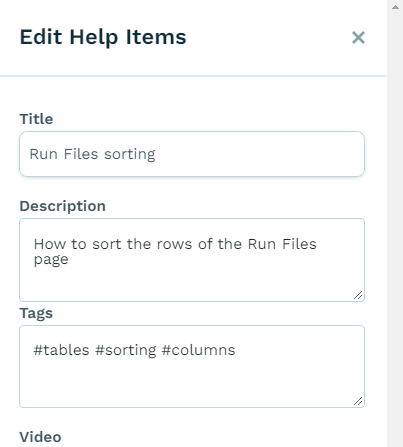
FR-HELP-004 UI Specifications
- Video selection via dropdown of existing videos
- Option to upload new video
- Video name field with default from filename, editable override
FR-HELP-005 UI Specifications
- Import/export follows standard configuration sheet pattern
- Excel file format (configuration.xlsx)
Visual References:
- Import/export reference:
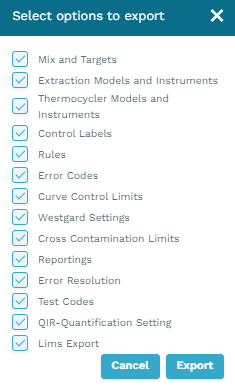
Implementation (Illustrative)
| Component | Type | Location | REQs Implemented |
|---|---|---|---|
HelpItem | Model | app/HelpItem.php | REQ-HELP-001, 002, 003, 005 |
PageHelpItemsController | Controller | app/Http/Controllers/PageHelpItemsController.php | REQ-HELP-001, 002 |
HelpItemsController | Controller | app/Http/Controllers/HelpItemsController.php | REQ-HELP-003, 004 |
HelpItemsExport | Export | app/Exports/Config/HelpItemsExport.php | REQ-HELP-005 |
HelpItemsImportSheet | Import | app/Imports/Sheets/HelpItemsImportSheet.php | REQ-HELP-005 |
GetHelpItemsAction | Action | app/Actions/GetHelpItemsAction.php | REQ-HELP-001, 002 |
StoreHelpItemsAction | Action | app/Actions/KitConfigurations/HelpItems/StoreHelpItemsAction.php | REQ-HELP-003 |
UpdateHelpItemsAction | Action | app/Actions/KitConfigurations/HelpItems/UpdateHelpItemsAction.php | REQ-HELP-003 |
HelpItemSaveRequest | Request | app/Http/Requests/HelpItemSaveRequest.php | REQ-HELP-003 |
HelpItemQueryBuilder | Query | app/QueryBuilders/HelpItemQueryBuilder.php | REQ-HELP-001, 002 |
Architecture Notes
- Help Display Flow: Frontend requests help items via
PageHelpItemsController, which filters by current page context usingGetHelpItemsAction - Help Search: Search queries passed to
GetHelpItemsActionfilter across title, description, and tags - Admin Configuration: CRUD operations handled by
HelpItemsControllerusing store/update actions - Video Management: Video associations stored via
help_video_idFK on HelpItem model, referencing HelpVideo model - Import/Export: Uses standard kit configuration import/export pattern (see REQ-CONFIGIO-008)
Frontend Components
| Component Type | Location |
|---|---|
| View | views/HelpItems.vue |
| Components | components/help-items/ |
Traceability Matrix
| Requirement | Title | Verification | Implementation | Test Cases | Status |
|---|---|---|---|---|---|
| REQ-HELP-001 | Display Context-Sensitive Help | Test | HelpItem, PageHelpItemsController, GetHelpItemsAction, HelpItemQueryBuilder | [Pending] | Draft |
| REQ-HELP-002 | Search Help Content | Test | HelpItem, PageHelpItemsController, GetHelpItemsAction, HelpItemQueryBuilder | [Pending] | Draft |
| REQ-HELP-003 | Configure Help Items | Test | HelpItem, HelpItemsController, StoreHelpItemsAction, UpdateHelpItemsAction, HelpItemSaveRequest | [Pending] | Draft |
| REQ-HELP-004 | Manage Help Videos | Test | HelpItemsController | [Pending] | Draft |
| REQ-HELP-005 | Import/Export Help Configuration | Test | HelpItem, HelpItemsExport, HelpItemsImportSheet | [Pending] | Draft |
Notes
Reference Data: Help Topics per Screen
The following defines the recommended help topics for each application screen. This serves as reference data for content configuration.
| Screen | Recommended Help Topics |
|---|---|
| Runfile List | Using filters and previewing rows; Searching and previewing patient results; Notifications |
| Runfile Report | Notifications and quick filters; Print; Edit run; Outcomes (Managing control errors, Managing sample errors); Assay summary widget and quick filters; Outcome summary widget and quick filters; Westgard widget; Plate map widget; Filters; Viewing curves (curve modal); Well "actions"; Comments including tagging/notifying other users |
| LJ Report | How to edit and create ranges; Generating a Levey-Jennings report; Using the LJ plot; Download pcr.ai's guide to Westgard |
| Trends Report | Generating a trend report; Using the trends plot; How to drill down to results; How to edit and create alarms |
| Outcomes Report | Generating an outcomes report |
| Import | Upload by drag & drop; Upload by "Import files" button |
Source: 3.0.0-Help topics per Screen (all rows)
Out of Scope
The following items were explicitly marked as out of scope:
- Ability for admin (or other manager users) to see a record of videos watched by each user
- Note: Tracking video completion is likely technically infeasible
Source: 3.0.0-Context sensitive help (Out of Scope section)
Open Questions
| ID | Question | Source | Owner | Date Raised |
|---|---|---|---|---|
| OQ-001 | Assumptions inferred from context, not explicitly stated in source. Confirm accuracy with SME. | Assumptions | @SME-TBD | TBD |
Acceptance Tests
Test: REQ-HELP-001
Test: Verify help availability indication
Given: User navigates to an application screen with configured help items
When: The screen loads
Then: The system shall display a help availability indicator
Test: Verify help display on request
Given: User is on a screen with configured help items
When: User requests help
Then: The system shall display help items relevant to the current screen
And: Each help item shall show its title and description
Test: Verify video indication
Given: Help items are displayed
When: A help item has an associated video
Then: The system shall indicate video availability for that item
Test: Verify video playback
Given: User selects a help item with associated video
When: User requests video playback
Then: The system shall play the associated video
Test: REQ-HELP-002
Test: Verify search capability
Given: User accesses the help interface
When: User observes the interface
Then: The system shall provide a search capability
Test: Verify search functionality
Given: User is viewing the help interface
And: Help items exist with searchable content
When: User enters a search query
Then: The system shall display only help items matching the query
And: The system shall highlight search terms in matching results
Test: Verify tag search
Given: A help item has tags configured
And: User is a non-admin user
When: User searches for a tag term
Then: The system shall display the matching help item
And: Tags shall not be visible to the user
Test: REQ-HELP-003
Test: Verify help item creation
Given: User is logged in as admin
When: User creates a new help item with title, description, and screen assignment
Then: The system shall save the help item
And: The help item shall appear on assigned screens
Test: Verify tag configuration
Given: User is logged in as super-admin
When: User configures tags for a help item
Then: The system shall save the tags
And: The tags shall be searchable
Test: Verify order configuration
Given: User is logged in as admin
And: Multiple help items exist
When: User specifies display order for help items
Then: Help items shall display in the configured order
Test: Verify order validation
Given: User is editing a help item
And: There are N help items configured
When: User enters an order value greater than N
Then: The system shall display a validation error
And: The system shall prevent saving the invalid configuration
Test: REQ-HELP-004
Test: Verify video selection
Given: User is logged in as admin
And: Videos exist in storage
When: User edits a help item
Then: User shall be able to select from existing videos
Test: Verify video upload
Given: User is logged in as admin
When: User uploads a new video file
Then: The system shall store the video
And: The system shall assign the filename as the default video name
Test: Verify video name override
Given: A video has been uploaded with a default name
When: User edits the video name
Then: The system shall save the custom name
Test: REQ-HELP-005
Test: Verify export
Given: Help items are configured in the system
When: Admin user exports configuration
Then: The system shall generate an Excel file
And: The file shall contain all help item configuration fields
Test: Verify import
Given: An Excel file contains help item configuration
When: Admin user imports the file
Then: The system shall create or update help items per the file contents
Test: Verify order normalization on import
Given: Configuration file has help items with order values 1, 5, 12, 40
When: Admin user imports the file
Then: Order values shall be normalized to 1, 2, 3, 4
Related Design Documents
| Design Document | Relevant Sections |
|---|---|
| SDD Configuration | Help Configuration |
| SDD Architecture | S3 Storage Integration |
Appendix: Process Artifacts
Completion Checklist
- All requirements are capability-level (describe behavior, not UI)
- Requirement variants consolidated (no requirement explosion)
- UI details are fully demoted to Illustrative section
- Configuration options are not encoded as requirements
- Acceptance criteria describe behavior, not UI mechanics
- Every requirement has acceptance criteria and source traceability
- Error handling addressed for I/O, validation, and external system requirements
- Open questions documented with owners assigned
- Consolidations documented in Reviewer Notes with reversibility info
- Module can survive a full UI redesign unchanged
- Refinements folded into Acceptance Criteria
- Traceability matrix is complete
Reviewer Notes
Consolidation: REQ-HELP-003 (Configure Help Items)
The following items from the source were consolidated into REQ-HELP-003:
| Original Item | Source Reference | Disposition |
|---|---|---|
| REQ-HELP-003 (Order help items) | 3.0.0-Context sensitive help (Rows 3, 4) | Merged → REQ-HELP-003 AC-05, AC-06, AC-07 |
| REQ-HELP-004 (Configure help items) | 3.0.0-Context sensitive help (Rows 11, 12) | Merged → REQ-HELP-003 AC-01 through AC-04 |
Rationale: Ordering is a specific aspect of help item configuration, not a separate capability. Both represent administrator configuration of help items. The consolidated requirement covers the full configuration capability.
Reversibility: To restore original structure, reference:
- Source:
output/pilot/restructured/help.md - Original REQ-HELP-003: Order help items
- Original REQ-HELP-004: Configure help items
Renumbering: REQ-HELP-004 and REQ-HELP-005
Due to consolidation above:
| Original ID | New ID | Reason |
|---|---|---|
| REQ-HELP-005 (Manage help videos) | REQ-HELP-004 | Renumbered due to consolidation |
| (New) | REQ-HELP-005 | Import/Export extracted as distinct capability from configuration |
Rationale: Import/Export was embedded in original REQ-HELP-003 and REQ-HELP-004 but represents a distinct system capability (batch configuration via files vs. interactive configuration via UI).
Refinement Folding
The following refinements were folded into their parent requirements' Acceptance Criteria:
| Original | Folded Into | Content |
|---|---|---|
| REQ-HELP-001 RF-01 | REQ-HELP-001 AC (Video Support) | Video playback shall not support Picture-in-Picture mode |
| REQ-HELP-002 RF-01 | REQ-HELP-002 AC (Result Display) | Tags shall be searchable but not displayed to non-admin users |
| REQ-HELP-003 RF-01 | REQ-HELP-003 AC (Tag Configuration) | Tags shall be stored as space-separated values |
| REQ-HELP-003 RF-02 | REQ-HELP-003 AC (Screen Assignment) | Screen assignment shall use a multi-select interface for page selection |
| REQ-HELP-005 RF-01 | REQ-HELP-005 AC (Import) | Order normalization shall convert arbitrary positive integers to sequential 1-based ordering |